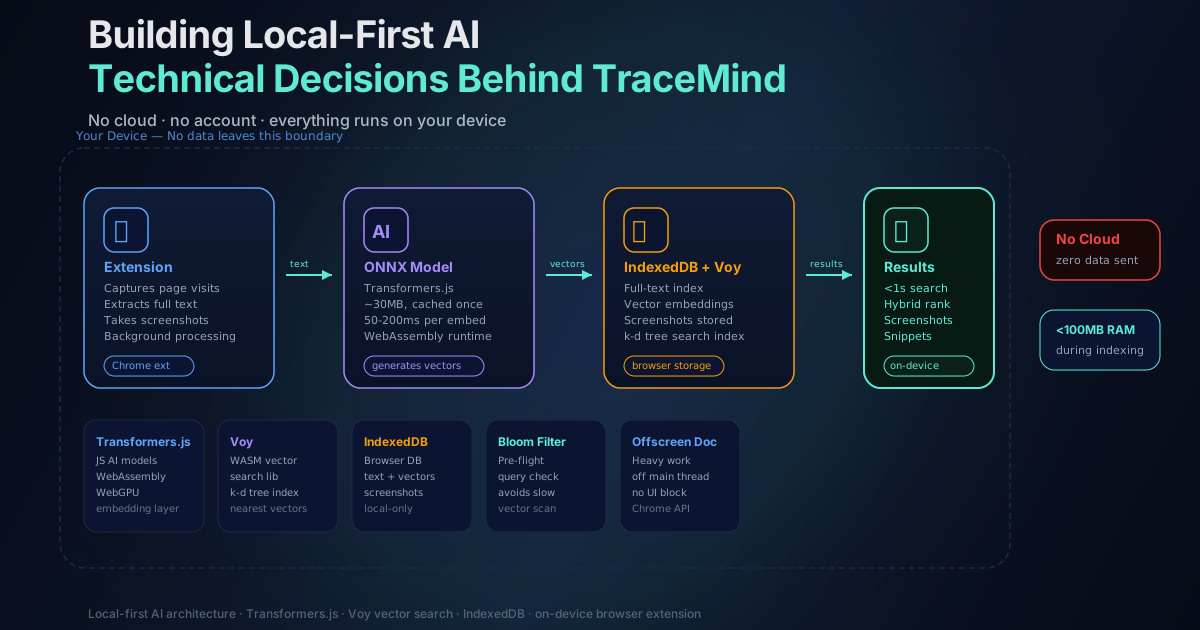
Building Local-First AI: The Technical Decisions Behind TraceMind
Updated July 2026
When I decided to build TraceMind, I had two options.
The easy path: send user data to a cloud API, run the AI there, return results. This is how most AI products work. It's faster to build, easier to scale, and the AI models are much more powerful.
The harder path: keep the core capture and search pipeline local in the browser. That minimizes centralized data handling while still allowing clearly disclosed network-backed features such as licensing and optional provider-backed Pro Chat.
I picked the hard path. Here's why, and how I made it work.
Why Local-First? The Privacy Argument
The obvious reason is privacy. Browser history is genuinely sensitive data. It reveals what you're interested in, what you're struggling with, what you're planning. Sending that to a server feels wrong, even if the server is secure and the company is trustworthy.
I didn't want to be in the business of storing anyone's browsing data. I didn't want to write a privacy policy that explains why it's actually fine that we're uploading your history. I wanted to build something where the privacy guarantee is architectural, not legal.
But there's another reason. Local-first software works better in some situations. Core search can work offline and avoids a network round trip. Captured history is stored on the device; Free keeps it until manual deletion, Pro can choose a finite window, and browser storage capacity still applies to both.
The tradeoff is technical complexity. Making AI run in a browser is harder than making API calls. Much harder, honestly.
The Foundation: Transformers.js
The foundation of TraceMind is a library called Transformers.js. It's a JavaScript port of the popular Hugging Face Transformers library, and it lets you run real AI models directly in the browser using WebAssembly and WebGPU. A few years ago this would have been science fiction. Now it's just npm install.
The specific task I needed is called text embedding. You give the model some text, and it returns a vector — a long list of numbers that represents the meaning of that text. Similar meanings produce similar vectors. So the vector for "JavaScript framework comparison" will be close to the vector for "React vs Vue analysis" even though they share almost no words.
This is what makes semantic search possible. Traditional keyword search checks whether words match. Semantic search checks whether meanings match.
Choosing the Right Embedding Model
I tested several embedding models before settling on one. The tradeoffs are always the same: bigger models are more accurate but slower and use more memory. I needed something small enough to load quickly and run on modest hardware, but good enough to actually understand what pages are about.
The model I landed on is all-MiniLM-L6-v2, which produces 384-dimensional embeddings. A quantized build keeps the local download manageable and is cached by the browser. Inference time varies materially with the device, browser state, and whether WebGPU is available, so a single benchmark would be misleading.
That's fast enough that you don't really notice it happening during normal browsing.
| Model property | Value | |---------------|-------| | Model name | all-MiniLM-L6-v2 | | Embedding dimensions | 384 | | Model build | Quantized for browser delivery | | Runtime | WebGPU (preferred) or WASM | | Performance | Device- and runtime-dependent |
WebGPU runs the model on your graphics card, which is much faster than CPU inference. When WebGPU isn't available, the WASM fallback still works fine — just slightly slower on lower-end hardware.
The Hybrid Search Architecture
Pure semantic search has a weakness: if you remember an exact phrase or URL, vector similarity won't necessarily surface it first. And pure keyword search misses conceptual matches entirely.
So I built a hybrid. TraceMind combines:
- Semantic vector search: finds pages with similar meaning to your query
- FlexSearch full-text search: finds pages with exact keyword matches
- Reciprocal Rank Fusion (RRF): merges the two result lists into one ranked output
RRF works by taking each result's position in each individual ranking and computing a combined score. A page that appears at position 3 in semantic results and position 5 in keyword results will rank higher than a page that only appears in one list. It's a simple but effective way to combine rankings without needing to know how to weight the scores directly.
The practical effect is that searches can handle both vague conceptual queries ("that article about rate limiting") and exact lookups ("exponential backoff algorithm"). Cold-model and lower-powered-device performance can differ from a warmed search.
Vector Search at Scale: Brute-Force Cosine
Once you have embeddings, you need a way to search them. The textbook answer is an approximate nearest neighbor index, and I originally reached for one. The problem is that the WASM vector libraries that build those indexes rely on the kind of dynamic code generation that Manifest V3's Content Security Policy forbids. Fighting the CSP for a speed optimization I did not need turned out to be the wrong trade.
So TraceMind does the simple thing: brute-force cosine similarity in plain JavaScript. The query vector is compared against every stored vector, and the closest ones win. To keep that fast, the embeddings live in a packed int8 cache rather than as scattered float arrays, so the comparison loop runs over compact, contiguous memory.
For a personal browser history rather than a web-scale corpus, this linear scan avoids an additional approximate index. It is exact, CSP-safe, and has no separate index to build, serialize, or keep in sync. Runtime still grows with corpus size and varies by device.
Storage: IndexedDB
Everything is stored in IndexedDB, which is the browser's built-in database for structured data. It handles page content, embeddings, screenshots, and metadata. IndexedDB has some quirks — its async API is verbose, and it doesn't support the kind of complex queries you'd write in SQL — but it's the only real option for storing significant amounts of data locally in a Chrome extension.
I store:
- Page text: extracted with Mozilla's Readability library, same as Firefox's reader mode
- Embeddings: 384-float32 vectors per page
- Screenshots: compressed images, 320x240 on Free tier, up to 1920x1080 on Pro
- Metadata: URL, title, visit timestamp, domain, tags, notes
To reduce storage use, captured text is compressed and content hashes help avoid redundant indexing. Actual savings depend on the pages, and browser storage capacity remains the practical limit.
The Background Processing Challenge
One challenge I didn't fully anticipate: Chrome's background processing restrictions. Extensions aren't supposed to do heavy work in the background because it drains battery and slows down the browser. But generating embeddings is inherently heavy work.
I solved this using an offscreen document — a hidden page where the extension can do intensive processing without blocking the main browser thread. Embedding generation happens in this offscreen context, so the browser UI stays responsive while indexing runs.
I also added throttling so indexing backs off when the browser is under load. The extension detects CPU pressure and defers embedding generation until things calm down. Honest result: most users never notice it's running.
Content Extraction: Mozilla's Readability
Raw HTML is noisy. Navigation menus, sidebars, footers, cookie banners — none of that should end up in the search index. If it does, search quality degrades.
TraceMind uses Mozilla's Readability library to extract the main content from pages before indexing. It's the same library that powers Firefox's reader mode. It identifies the primary article or content block, strips boilerplate, and returns clean text.
For Single Page Applications that update content without full page loads, I intercept pushState and replaceState events to detect navigation and trigger re-indexing. This handles React, Vue, Next.js, and similar frameworks that don't reload the page on route changes.
Encryption: Optional but Serious
TraceMind Free uses local browser storage without TraceMind passphrase encryption. Pro users can optionally enable passphrase encryption for local content and create new encrypted backups using AES-256-GCM.
This protection is optional and must be configured by the user. Local storage by itself should not be described as encrypted.
Pro users can create passphrase-encrypted backups with the same AES-256-GCM protection used for supported local content. Importing or decrypting an encrypted backup is free, so a lapsed subscription does not lock a user out of their data.
Performance: The Numbers
Performance depends on the model state, browser, hardware, corpus size, and page content. The design choices are therefore more durable than a benchmark captured on one development machine:
- keep the model and ranking pipeline on-device;
- cache compact embeddings for repeated search;
- use content hashes to reduce duplicate work;
- run heavier processing outside the visible page;
- preserve keyword search as a useful cold-model and exact-match path.
The goal is interactive local retrieval, not a promise that every device or corpus returns in the same number of milliseconds.
What I'd Do Differently
Honestly, the IndexedDB API is painful. If I were starting today, I'd look harder at OPFS (Origin Private File System) for some of the storage, which has better performance characteristics for large binary data like embeddings. The browser storage ecosystem has moved fast in the last two years.
I'd also invest earlier in the hybrid search architecture. The initial version was pure semantic search, and it was good for vague queries but frustrating when users wanted exact matches. Adding FlexSearch and RRF was the right call, but it took longer than it should have.
The Broader Point
Could I have shipped something simpler by using OpenAI's API? Yes. Would it have been more powerful? Probably. But it wouldn't have been the product I wanted to build.
TraceMind is local-first because I believe the core browser-history corpus and search pipeline should stay under the user's control. Optional Pro Chat has a separate, explicit provider boundary: selected sources and current chat context go directly to the configured provider only when the user invokes that feature.
If you're building local-first AI applications, I'd recommend starting with Transformers.js. The ecosystem is maturing quickly. The hard part isn't the AI anymore — it's all the engineering around it: storage, deduplication, background processing, fallbacks, and performance tuning.
For more on the privacy implications of the on-device approach, the on-device AI explainer covers WebGPU, WASM, and why the local model approach matters for user trust.
And if you want to experience the result: TraceMind is free to install on Chrome, Brave, and Edge.
About the Author
A full-stack developer specializing in React, Next.js, and TypeScript. Currently focused on TraceMind. Follow my work on GitHub.